

We’re excited to announce the release of License Manager PRO v1.3.2, introducing two powerful new features:
- QR Codes
- Webhooks
Both features streamline WooCommerce license management and improve automation for store owners and developers running WooCommerce-based license systems.
This product release note walks through what’s new, why it matters, and how to set it up effectively.
Version Update | What’s New in License Manager Pro v1.3.2
1. QR Codes for Instant License Access
With the new QR Code feature, users can now copy or activate licenses instantly by simply scanning a code.
This saves time and eliminates the need for manual entry during activation.
How It Works
- License QR Code:
Allows users to scan and copy the license key for manual activation.
(Ideal when activation is done manually in the user dashboard.) - License Activation QR Code:
Lets users activate their license directly by scanning the QR code.
The scan redirects them to the configured activation page, where the license key activates automatically.
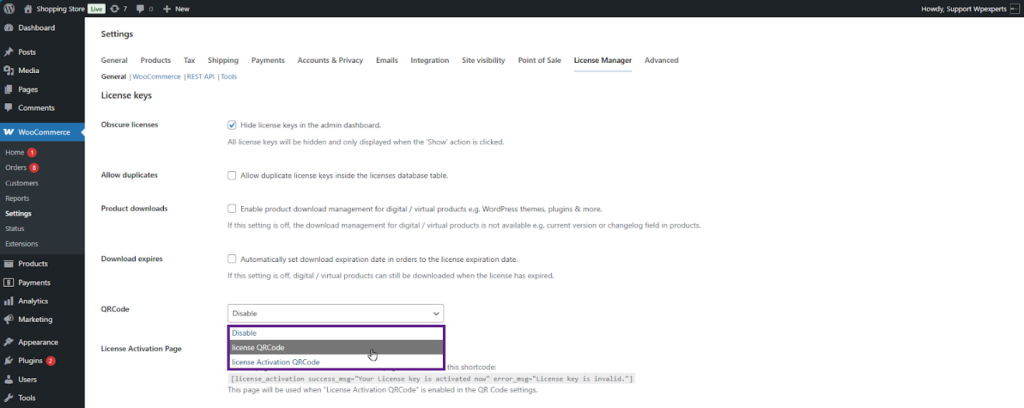
Back-End Settings
To enable QR Codes:
- Go to Admin Dashboard → WooCommerce → Settings → License Manager
- Select your preferred option under the QR Code dropdown:
- License QR Code (to copy the key)
- License Activation QR Code (to auto-activate)
- Choose the activation page that contains the shortcode:
- [license_activation success_msg=”Your License key is activated now” error_msg=”License key is invalid.”]
- Click Save Changes.

Front-End View
After enabling, users will see their license QR codes under My Account → License Keys.
- License QR Code Enabled:
Displays a scannable QR code. When scanned, the key is instantly copied.
(Make sure the logged-in user has an assigned license key and the order status is “Completed.”)

License Activation QR Code Enabled:
Shows a QR code that, when scanned, redirects users to the license activation page for one-tap activation.

2. Webhooks for Real-Time License Events
This version update introduces Webhook support, enabling real-time license event management through REST APIs.
Admins can now configure webhook URLs and automatically send license data to third-party systems for:
- License creation
- License activation
- License update
- License deletion
This feature is especially useful for developers integrating with CRMs, billing systems, or monitoring dashboards.
Back-End Configuration
To enable and test Webhooks:
- Create a webhook endpoint.
- Copy your unique webhook URL.
- Go to Admin Dashboard → WooCommerce → Settings → License Manager.
- Scroll down and enable Webhooks.
- Paste your webhook URL in the provided field.
- Click Save Changes.

Testing the Webhook
- Open Postman or your API testing tool.
- Trigger an event, for example, create or update a license using the API route:
- POST – v2/licenses
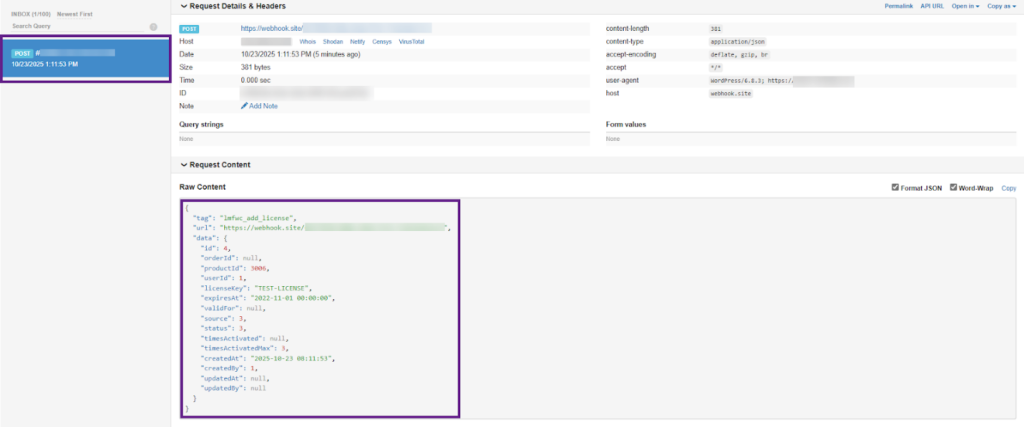
- Return to your webhook endpoint (e.g., webhook.site).
You’ll see a JSON payload confirming that your webhook is working correctly.
License Manager PRO v 1.3.2 – Version Summary
| Feature | Description |
|---|---|
| QR Codes | Simplifies activation with scannable license access |
| Webhooks | Enables event-based license sync with external systems |
Ending Note
License Manager Pro v1.3.2 update focuses on automation, usability, and developer control. By introducing QR Codes and Webhooks, License Manager PRO is now more integrated, user-friendly, and future-ready.
So, update your plugin today to experience smarter license management.