

Ever felt like your WooCommerce admin area was a bit sluggish? Like you were waiting around more than you were working? Good news! One of the absolute biggest wins in WooCommerce 9.9 is its laser focus on speed and efficiency. On 9 June 2025, WooCommerce released its latest version, i.e., WooCommerce 9.9. Supposedly, the release came a week later (earlier, it was expected to be rolled out on 2nd June 2025). The stretch was related to rigorous testing and compatibility with the latest WordPress 6.8 release.
The team behind WooCommerce has done some serious heavy lifting in the backend, and you’re going to feel the difference.
We’re talking about a potential 95% reduction in page load times when you’re navigating your admin. Imagine clicking through orders, updating products, or tweaking settings, and everything just snaps into place.
That’s the kind of faster WooCommerce backend experience we’re talking about. This isn’t just a nicety; it’s a massive productivity booster for any online store management—less waiting, more doing.
Thanks to HPOS (High-Performance Order Storage), the WooCommerce 9.9 release boosts data access speeds and dashboard performance, making it among the quickest WooCommerce releases thus far.
This kind of WooCommerce performance improvement is exactly what store owners need to keep things running smoothly, especially as your business grows. No more frustrating delays, just a more fluid experience that helps you manage your e-commerce platform with ease.
Quick Video Glance at WooCommerce 9.9 Release
WooCommerce 9.9: What’s in the Store

Super-Smart Product Filters Block
Okay, let’s talk about your customers. We all know how frustrating it can be when you’re shopping online and trying to find something specific, but the filters are clunky or slow. Well, WooCommerce 9.9 update has introduced a brand-new Product Filters block, and it’s a game-changer.
This isn’t your grandma’s filter system. It’s powered by something called the Interactivity API, which essentially means your customers get real-time WooCommerce filtering without needing to reload the entire page.
They pick a category, a price range, or a color, and boom—the results update instantly. It’s incredibly smooth, especially on mobile, where the filters even appear in a neat modal for a cleaner Browse experience.
Think about how much better that makes the shopping journey. Quicker finds, less frustration, and ultimately, a happier customer who’s more likely to complete a purchase. This dynamic product filtering is a huge step forward for your WooCommerce customer experience.
Blueprints: Your New Secret Weapon for Store Setup
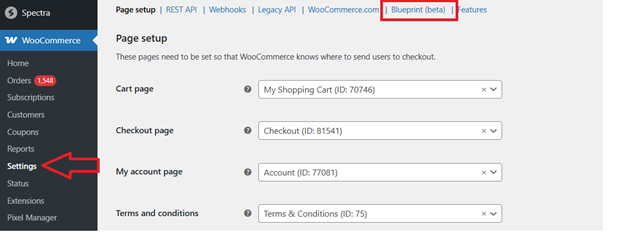
This next feature is a bit of a hidden gem right now, tucked behind a “feature flag” in your settings, but it’s incredibly powerful, especially if you manage multiple stores or are an agency. It’s called Blueprints, and it’s all about making it super easy to export and import your entire store’s settings.
Imagine you’ve painstakingly set up your shipping zones, tax rates, payment gateways, and all your core WooCommerce options just perfectly on one site.
With Blueprints, you can essentially create a “snapshot” of those settings and quickly apply them to a brand new WooCommerce installation. This means that maintaining consistent configurations across different websites or setting up new client sites becomes incredibly efficient.
No more manual entry of every single setting! You’ll find this under WooCommerce > Settings > Advanced > Blueprints once you enable it. It’s a fantastic addition for anyone looking to streamline their WooCommerce store configuration.
More Control, Less Hassle: Smart Updates to Your Store
WooCommerce 9.9 release also brings a bunch of smart, practical updates that just make day-to-day operations smoother.
- Targeted Product Exports: Got a massive product catalog but only need to export a handful of specific items? Now you can! This release gives you the ability to export specific products and their variations directly by ID. This is a huge time-saver for bulk edits or migrating just a slice of your inventory. No more sifting through massive CSV files when you only need a few lines of data. This selective product export feature truly streamlines your WooCommerce product management.
- Hiding Premium Shipping Just Got Easier: Ever offer free shipping, but your customers still see a more expensive option they have to consciously deselect? Annoying, right? WooCommerce 9.9 now has a built-in setting that lets you hide premium shipping options when free shipping is available. This is a simple, yet effective, way to make your checkout clearer and nudge customers towards that attractive free option. Before, this often required custom code or extra plugins, so it’s a welcome native improvement for your WooCommerce checkout experience.
- Automatic Database Updates (Finally!): We all know updates are important, but that “Update WooCommerce Database” notification could sometimes be a bit of a pause point. Well, good news: WooCommerce 9.9 handles automatic database updates in the background! Your store will keep running smoothly while everything gets updated. Of course, you can still opt for a manual update if you prefer with a quick code snippet, but for most folks, this means fewer headaches and a smoother, safer WooCommerce update process.
Gaining Deeper Insights: Cost of Goods Sold (COGS)
For any business, truly understanding your profit margins is essential. WooCommerce 9.9 takes a big step in this direction by integrating Cost of Goods Sold (COGS) functionality directly into the core platform. This means you can now define the actual cost of purchasing or producing each product you sell.
While this feature is currently behind a feature flag (you’ll find it under WooCommerce > Settings > Advanced > Features > Cost of Goods Sold), its inclusion marks a significant move towards providing more robust WooCommerce profitability analysis right out of the box.
Knowing your COGS will give you a much clearer picture of your net profit, helping you make smarter business decisions. It’s a powerful tool for serious e-commerce businesses.
A Fresh Look and Feel: Streamlined Settings and Payment Pages
Nobody likes a cluttered interface, and the WooCommerce team has been working on making your settings area more intuitive. You’ll notice a refined and cleaner WooCommerce settings design in 9.9, making it easier to navigate and configure your store’s options. This intuitive WooCommerce interface simplifies day-to-day tasks.
Moreover, the new React-based Payments Settings page has been finalized and rolled out. This brings a more modern, faster, and more unified experience to managing all your payment gateways and settings. It’s all about making those critical configurations smoother and more pleasant to interact with.
Even More Customization: Expanded Email Templates
WooCommerce 9.9 also quietly brings some nice improvements for your store’s email communications. You’ll find expanded email templates, giving you more flexibility and options to customize the messages your customers receive.
This means you can further refine the look, feel, and content of order confirmations, shipping updates, and other crucial transactional emails, making them perfectly align with your brand’s voice and style.
WooCommerce 9.9: What is in it for Developers

If you’re a developer or work with one for your WooCommerce store, there are a few important technical notes in this release:
- Client-Side Navigation in Product Collection Blocks: The way WooCommerce detects compatibility for client-side navigation in Product Collection blocks has been improved. This means if you’re using third-party blocks that support the Interactivity API, your site can deliver even smoother page transitions and better overall performance.
- Non-Latin Character Tax Class Names: There’s an important fix related to tax class names containing non-Latin characters when created via the API. This ensures better global compatibility for your store’s tax configurations.
- Theme Detection (WC_current_theme_is_FSE_theme): If you’ve been using WC_current_theme_is_FSE_theme in your custom code, be aware that it’s reverting to the standard wp_is_block_theme function. This change promotes consistency in how block themes are identified.
These subtle yet important tweaks help ensure the platform remains robust and flexible for custom development, supporting a wide range of WooCommerce integrations and unique store needs.
Important Advice Before You Hit That Update Button
Okay, this is super important, so lean in! While WooCommerce 9.9 release update is awesome, the golden rule of WooCommerce updates always applies: always test first!
- Staging Environment is Your Best Friend: Seriously, never update your live store directly. Set up a WooCommerce staging environment (a copy of your live site) and test the update there first. Play around with it, click through your most important pages, make a test purchase. Make sure everything works flawlessly.
- Consider the WooCommerce Beta Tester Plugin: If you’re keen to get a sneak peek or help test future releases, the free WooCommerce Beta Tester plugin is a great tool. But for your actual live store, stick to the stable releases after thorough testing.
- Patience Pays Off: The official release date for 9.9 was June 9, 2025. Even with the best intentions, major software releases sometimes have a few tiny bugs, including any WooCommerce subscriptions, that pop up after real-world usage. A common recommendation, and one we heartily agree with, is to wait three to four days, or even a week, after a major release before updating your live environment. This gives the community time to identify any potential issues, and often, small patch releases (like a 9.9.1) come out quickly to address them. Waiting for that first minor patch can save you a lot of headaches!
By following these WooCommerce update best practices, you’re protecting your e-commerce business from potential downtime and ensuring a smooth transition.
Changelog for WooCommerce 9.9
Here is the complete GitHub repository for the WooCommerce 9.9 changelog
Peeking into the Future: What’s Next with WooCommerce 10.0?
The innovation doesn’t stop here! Looking ahead, WooCommerce 10.0 is anticipated to arrive soon (maybe next month!), and it’s expected to bring another significant evolution: a new official WooCommerce block theme.
For a long time, Storefront has been the go-to base theme for WooCommerce. But with the continued adoption of WordPress’s block editor and Full Site Editing (FSE), WooCommerce is getting its own modern, block-native base theme.
This means even more flexibility and visual control over your store’s design, letting you truly customize your shop without needing to touch a line of code. This WooCommerce block theme will be a game-changer for e-commerce web design.
Final Words on WooCommerce 9.9 Release
WooCommerce 9.9 is a robust update that clearly demonstrates the platform’s commitment to making your online store faster, smarter, and easier to manage. From the incredible backend performance boosts and the intuitive Product Filters block to the hidden power of Blueprints and the practical addition of COGS, these features are designed to help your e-commerce operations run like a well-oiled machine.
Remember to take it slow with the update—test first, be patient, and ensure everything is synced with your existing theme and plugins. But once you’re ready, embracing WooCommerce 9.9 will undoubtedly provide a more efficient experience for you and a more enjoyable shopping journey for your customers.
Here’s to a faster, smarter, and more profitable online store!