
The code you write is only half the product. The other half is how you control, distribute, and track access to that code. If you build commercial software, you must control who can use it, which features they unlock, and when access ends. That control lives inside your license management architecture. And that’s where the core decision about self-hosted vs cloud license management comes in.
For Independent Software Vendors (ISVs) and enterprise application managers, the debate between Self-Hosted and Cloud License Management is not merely a technical preference—it is a strategic decision that dictates your business model, your security posture, and your relationship with your customers.
Are you prioritizing the “Air-gapped” security requirements of a defense contractor, or the agile, feature-flagging capabilities of a modern SaaS?
This blog moves beyond generic definitions to analyze the architectural, operational, and commercial differences between on-premise license servers and cloud-based entitlement management.
Hosting Infrastructure vs Hosting Licenses
Before understanding the comparison, it is critical to clarify a common misconception in the industry.
When we discuss “Self-Hosted vs Cloud,” we are not asking where your application runs (e.g., AWS vs your own data center). We are asking: Where does the “Source of Truth” for the license entitlement live?
- Application Hosting: Where the software executes.
- License Management: Where the software checks to see if it is allowed to execute.
You can have a desktop application installed locally that checks a cloud license server for permission. Conversely, you can have a server-side application that checks a self-hosted local license manager on the same network.
Understanding this distinction is the first step in choosing the right architecture.
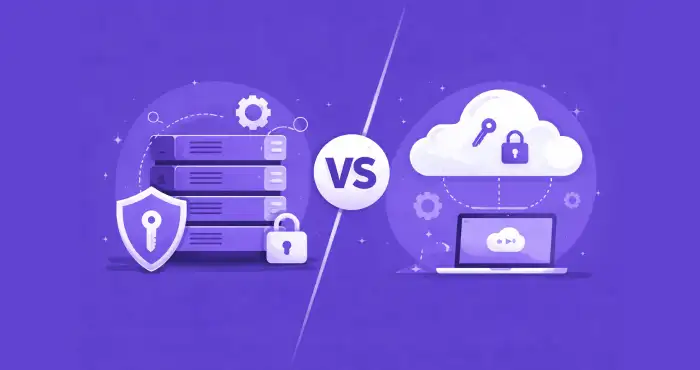
Defining the Contenders: Self-Hosted vs Cloud License Management
Before comparing trade-offs, define the mechanics. Self-hosted vs cloud license management is not philosophy. It is system design.
What is Self-Hosted License Management?
Self-hosted license management places licensing logic inside the customer’s infrastructure. The validation authority runs on-premise.
How it works
The software checks against a local source of truth, such as:
- A license file (.lic)
- A hardware dongle
- A local license server like FlexNet or RLM
The license server runs within the customer’s network. The application queries this server to confirm entitlements.
Key characteristic
No external internet connection is required for validation. This makes it suitable for air-gapped or restricted environments.
In this model, the customer controls the license server. Updates to entitlements often require manual steps, such as replacing license files or restarting services.
What is Cloud License Management?
Cloud license management, often called Licensing as a Service (LaaS), stores and validates entitlements on the vendor’s remote infrastructure.
How it works
The application communicates with the vendor’s licensing system using:
- Secure API calls
- JWT tokens
- Periodic “heartbeats”
The server verifies user identity, device fingerprint, subscription status, and enabled features in real time.
Key characteristic
Internet connectivity is required, either constantly or at defined intervals. In return, vendors gain:
- Instant feature toggling
- Real-time subscription enforcement
- Usage analytics
- Centralized control
In cloud vs on-premise license management, the core difference is simple. Self-hosted moves authority to the customer. Cloud licensing keeps authority with the vendor.
Quick Comparison of Self-Hosted vs Cloud Licensing
This table captures the structural difference in self-hosted vs cloud license management.
| Feature | Self-Hosted (On-Premise) | Cloud License Management |
|---|---|---|
| Connectivity | Offline / Air-Gapped Capable | Requires Internet (Periodic or Constant) |
| Data Privacy | High. Data stays on-site | Vendor-managed. Data leaves the site |
| Implementation | Complex. Requires local license server setup | Simple. API or login-based validation |
| Anti-Piracy | Moderate. Vulnerable to VM cloning and local patching | High. Real-time validation and centralized control |
| Best For | Defense, Manufacturing, High-Security Enterprise | SaaS, B2B Enterprise, Agile Software |
🡪 Self-hosted prioritizes isolation and customer control.
🡪 Cloud prioritizes vendor authority and monetization flexibility.
Neither is universally better. It depends on your market, pricing model, and risk profile.
The Connectivity Divide: Air-Gapped vs Always-On
This is where self-hosted vs cloud license management becomes a hard technical constraint.
The “Phone Home” Requirement
Cloud license management requires the application to contact the vendor’s server. It may not need constant connectivity. But it must “phone home” at defined intervals.
That validation can include:
- Subscription status
- Device fingerprint
- Feature entitlements
- Usage limits
If the system cannot reach the licensing server, access may degrade or stop. That is the trade-off. You gain central control. But you depend on connectivity.
For many SaaS products, this is not a problem. For others, it is a blocker.
The “Dark Site” Reality
Some environments do not allow outbound traffic. Period.
- Defense networks.
- Energy infrastructure.
- Medical systems.
- Industrial control systems.
These are air-gapped environments. A self-hosted license server works because validation stays inside the perimeter. The authority runs locally. No data leaves the network.
For software vendors serving high-security sectors, license management for software vendors must support offline enforcement. Otherwise, the deal never closes.
The Hybrid Compromise
There is a middle ground. Some vendors use a cloud-controlled, locally-enforced model. Licenses are issued from the cloud. But they are leased or cached locally for a fixed period.
The system may validate:
- Once per 30 days
- Once per quarter
- Or during scheduled sync windows
This reduces dependency on constant connectivity. In practice, many modern software license management systems and license tracking tools evolve toward a hybrid. Connectivity is not just a technical detail. It defines which customers you can serve.
Security & Compliance on Self-Hosted vs Cloud License Management
Security arguments are often oversimplified. Both models have strengths. Both have weaknesses.
Self-Hosted: Data Sovereignty
With a self-hosted license server, all validation happens inside the customer’s infrastructure. No usage data leaves the premises. No external logs are stored by the vendor.
For customers concerned about GDPR, HIPAA, or internal compliance audits, this matters. Especially in regulated sectors.
From their perspective, on-premise license management reduces external exposure.
Self-Hosted: Piracy and Drift Risk
But there is a trade-off. When validation logic runs locally, it can be reverse engineered. Attackers can:
- Patch the binary
- Clone virtual machines
- Duplicate license files
- Bypass local checks
In self-hosted vs cloud license management, this is the structural weakness. Authority inside the customer’s environment is harder to police.
Cloud Licensing: Single Source of Truth
Cloud license management keeps entitlement authority on the vendor’s server. The server verifies:
- Device fingerprints
- Account identity
- Active subscription status
If someone clones a VM or shares credentials, real-time validation can detect anomalies. Access can be revoked instantly.
Security, in the end, depends on who holds authority. In self-hosted license server vs cloud licensing, control and risk move in opposite directions.
Self-Hosted vs Cloud License Management: Perpetual vs Subscription (SaaS)
Your licensing architecture shapes how you make money.
Self-Hosted and Perpetual Licensing
Self-hosted license management aligns with perpetual models. The customer buys a license. You issue a license file. It runs on their infrastructure. End of transaction.
Revenue is recognized upfront. Updates are occasional. Feature changes require new builds or updated license files.
This model fits:
- Capital expenditure budgets
- Industrial software
- Long deployment cycles
- Offline environments
In cloud vs on-premise license management, self-hosted supports a “fire and forget” structure. But it limits flexibility. Changing entitlements later is slower and manual.
Cloud License Management and Subscription Models
Cloud license management aligns with subscription and usage-based pricing.
You control entitlements centrally. You can:
- Activate or deactivate users instantly
- Enforce expiration dates automatically
- Meter usage in real time
- Adjust feature tiers without shipping new binaries
This supports operational expenditure models. Monthly billing. Annual contracts. Consumption pricing.
For license management for software vendors moving toward SaaS economics, cloud control is often required. Manual license files cannot scale to dynamic pricing.
Operational Overhead: The Hidden Costs of On-Prem
Self-hosted systems look simple on paper. In practice, they create operational friction.
The Integration Burden
A self-hosted license server must be installed and maintained by the customer’s IT team. That means:
- Server setup
- Port configuration
- Firewall exceptions
- Service restarts
- Version compatibility checks
You have seen the ticket.
“Please restart the FlexLM service.”
With cloud license management, validation is API-based. No local server to maintain. Fewer environment-specific failures.
The Update Cycle
Updating entitlements in a self-hosted environment often involves:
- Generating a new license file
- Emailing it to the customer
- Manual replacement
- Service restart
In cloud vs on-premise license management, cloud systems update automatically. Entitlements change in the backend. The application reflects the change on the next validation.
Operational overhead is rarely discussed in software license management comparisons. But over time, it becomes a measurable cost.
Self-Hosted vs Cloud License Management: Which Architecture Suits Your Software?
Often, companies try to force a “one-size-fits-all” approach. The reality is that hybrid approaches are often necessary. However, if you must choose a primary path, use this decision framework:
Choose Self-Hosted Licensing If…
- Your clients are “Dark”: You sell to military, government, or high-security banking sectors where outbound traffic is blocked.
- You sell Hardware/Appliance bundles: The software runs on a machine inside a factory that will never see the internet.
- Your sales cycle is “Fire and Forget”: You sell perpetual licenses and do not plan on aggressive upselling or feature toggling.
Choose Cloud Licensing If…
- You are battling Piracy: You are losing revenue to credential sharing or software cracks.
- You want Agility: You want to offer trials, convert to paid, and upsell features without manual intervention.
- You need Analytics: You want to know how customers are using your software (which features are popular?) to inform product development.
- You are pure SaaS: If your software is already web-based, on-premise licensing makes zero sense, and you don’t specifically need 3rd party SaaS platforms.
Wrap Up
The choice between self-hosted vs cloud license management is not just technical. It defines how you enforce revenue, manage risk, and interact with customers. If you are unsure which model fits your product roadmap, review your architecture and pricing strategy first. Then evaluate your licensing infrastructure.
To see how a modern software license management system can bridge on-prem security with cloud agility, explore the solutions at https://licensemanager.at/.
FAQs on Self-Hosted vs Cloud License Management
Yes, but with limitations. Most advanced Cloud Licensing solutions offer “License Borrowing” or “Offline Leasing.” The user connects once to download a secure, time-limited certificate to their device. They can then go offline for a set period (e.g., 30 days) before needing to reconnect to validate the lease.
In a self-hosted environment, the “lock” (the verification logic) and the “key” (the license file) both reside on the user’s hardware. This gives bad actors unlimited time and access to reverse-engineer the protection. Additionally, in virtualized environments, users can snapshot the state of a license server and clone it to other machines, multiplying their seat count without paying.
A Hybrid approach allows an ISV to manage all entitlements in a central Cloud Dashboard, but “push” licenses to local on-premise servers for specific clients. This gives the vendor centralized visibility while giving the customer local control and offline capabilities.