Quick answer: The best CodeCanyon alternative for an established author is your own store. Since 1 July 2026 Envato charges every author a flat 50% fee and exclusivity has ended, so you can keep your CodeCanyon listing while you sell directly. A WooCommerce store with License Manager for WooCommerce Pro issues license keys, delivers updates only to active keys, imports your existing buyers’ keys and turns one-time buyers into yearly renewals.
This guide is for authors of WordPress plugins, PHP scripts and app templates who want to move without losing the customers they already have.
Keep the full sale price on every license
License Manager Pro gives your own WooCommerce store license keys, updates for active buyers and yearly renewals.
View PricingLive DemoWhat changed on CodeCanyon in 2026?
Envato’s official announcement confirms three changes from 1 July 2026: exclusivity requirements are removed, the exclusive and non-exclusive account types are merged, and the author fee for all authors is 50%, so authors receive 50% of the item price component of the list price (the buyer fee is separate). For former exclusive authors this is a cut in earnings; former non-exclusive authors moved from a 55% fee to 50%. The change first showed in the 15 August payout, and sections 9 and 13 of the Envato Market Author Terms now say items are sold on a non-exclusive basis.
Two things follow. Half of every sale now goes to the marketplace, and you can now sell the same item elsewhere, including from your own site.
Why is leaving CodeCanyon hard?
The fee is not the hard part. Customers are. Authors often don’t have a customer list they can email, and buyers prove ownership with an Envato purchase code, not a license key from you. One author quoted by Freemius had 1,500 customers who each had to retrieve their purchase code by hand during a move.
CodeCanyon’s model is also one-time: buyers pay once and get support for a limited time. Your own store can sell yearly plans instead.
Which CodeCanyon alternative fits you?
| Option | Fee | Customer data | Licensing |
|---|---|---|---|
| Stay on CodeCanyon only | 50% author fee | Limited | Envato purchase codes |
| Another marketplace | Commission per sale | Usually limited | Depends on the marketplace |
| Merchant-of-record platform | Percentage per sale | Shared with platform | Platform SDK |
| Own WooCommerce store + License Manager Pro | Payment gateway fee + yearly plan | Yours | Keys, activations, update server |
If you are comparing WordPress options, see License Manager vs Easy Digital Downloads.
How do you move to your own store step by step?
Step 1: Sell on both channels for a while
Keep your CodeCanyon item live while you launch your store. Add a link from the item description and from your plugin’s settings page to your store, so new buyers can choose.
Step 2: Set up products, generators and Applications
Create a WooCommerce product per item, with variations for 1 site, 5 sites and unlimited. Give each variation a generator with its maximum activations and expiry (for example 365 days). For WordPress plugins, create an Application and upload the release so the update server can deliver it.
Step 3: Bring existing buyers over
License Manager has no built-in Envato purchase code check, so pick one of these routes:
- CSV import: if you have a buyer list (from Envato sales reports or your support desk), generate keys and import them from CSV or the clipboard, optionally marked as sold to an order.
- Migration offer: create a discounted WooCommerce product for existing buyers and check their purchase code manually or with a small custom check before you approve the order.
- REST API: developers can create licenses through the v2 REST API (single or bulk) from their own verification script.
Step 4: Ship updates only to active keys
The update server checks the public key and license key, and refuses updates when the key is not Active or is expired. Customers download releases from My Account, and you can make download links expire.
Step 5: Add yearly renewals
Sell the plans with WooCommerce Subscriptions. On each renewal, License Manager extends the existing key or issues a new one. Renewal periods can be anything from hours to years.
License Manager Pro is $129.99/year for 1 store site, $199.99 for 3 and $249.99 for 15. Compare the plans or try the Live Demo.
How should you price plans on your own store?
CodeCanyon sells a Regular and an Extended license with a fixed support period. On your own store you choose the plans. A structure that maps well for plugins and scripts:
| Plan | Sites (max activations) | Includes | Suggested approach |
|---|---|---|---|
| Single | 1 | Updates and support for 1 year | Close to your old Regular license price |
| Pro | 5 | Updates and support for 1 year | About 2x Single |
| Agency | Unlimited or 25 | Priority support for 1 year | About 3-4x Single |
Each plan is a variation with its own generator, so the activation limit and expiry come from the generator. Because you keep the full item price, you can often lower the price slightly and still earn more per sale than you did on Envato.

How do you import your existing buyers’ keys?
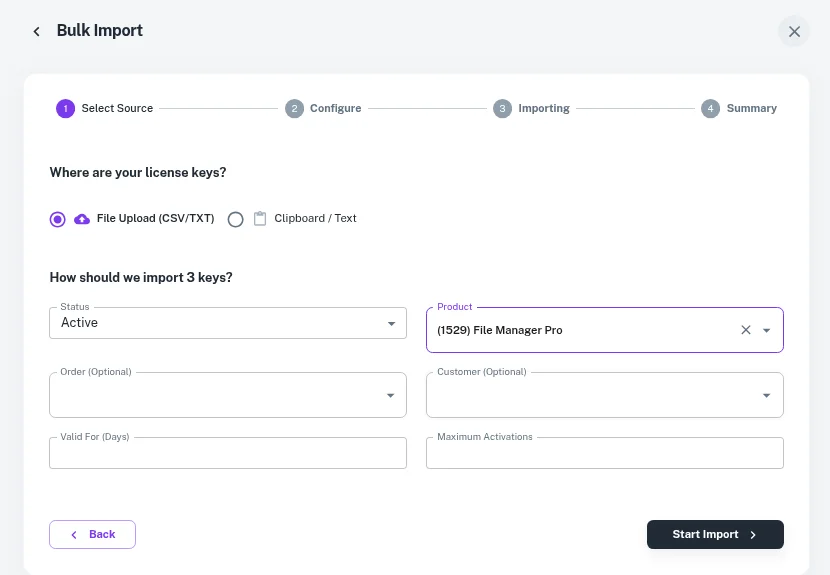
If you can build a buyer list (from Envato sales statements, your support desk or your own update server), import keys in bulk. License Manager accepts a CSV or TXT file, or keys pasted from the clipboard, and can mark them as sold to an order. Imported keys are marked with the Import source, so you can tell them apart later. See the docs on creating keys in bulk if you generate new keys for these buyers first.
How do you deliver updates from your own store?
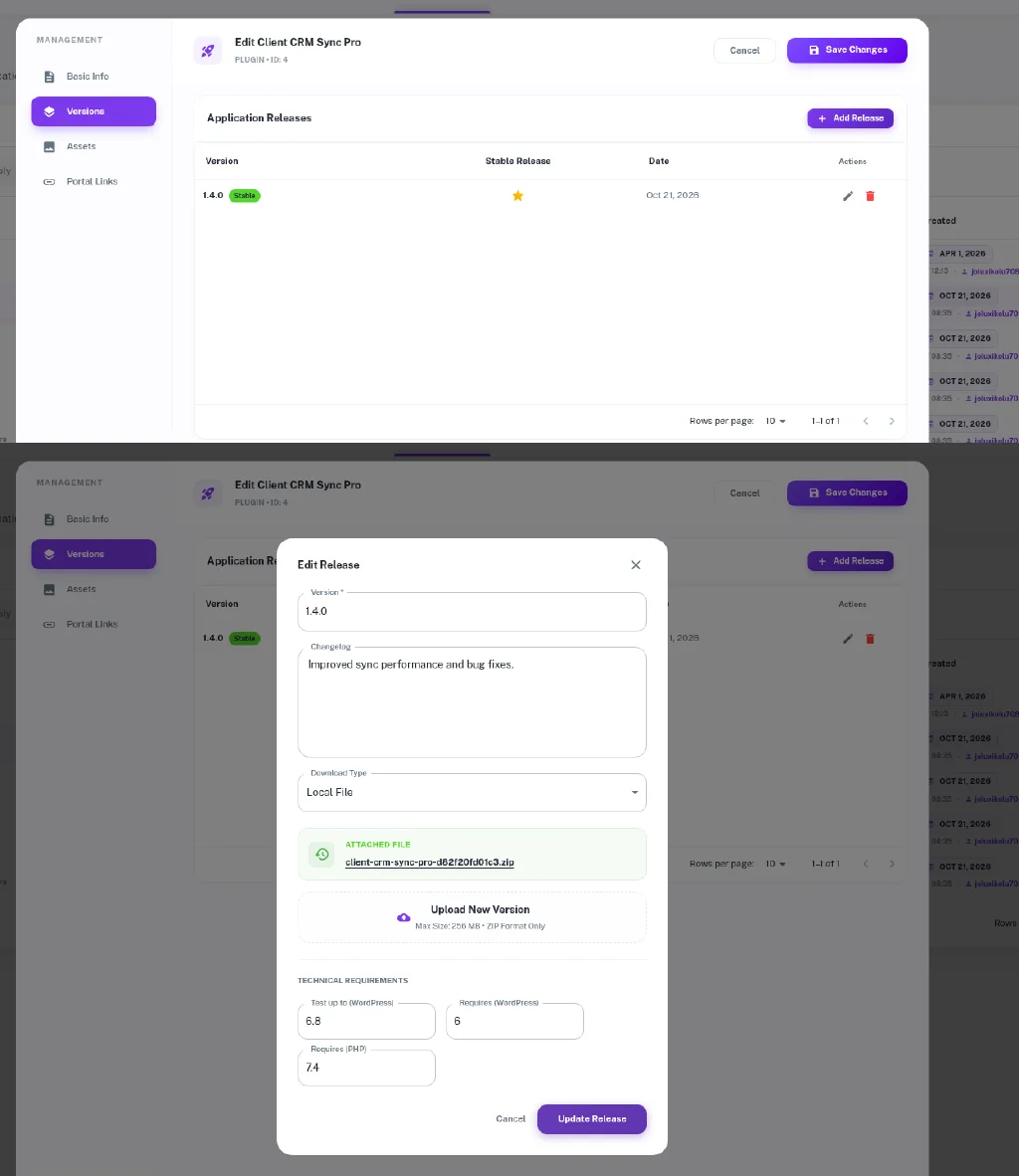
For WordPress plugins and themes, create an Application, upload each release with its version and changelog, and add the WordPress Plugin & Theme Activation SDK to your product. Customers then get updates in the normal WordPress Updates screen while their key is active. For PHP scripts, the PHP SDK covers activation, validation and downloads.
The Installed On screen then shows every site running your product, with the license, domain and last ping, which you never had on CodeCanyon.
Can you check Envato purchase codes automatically?
License Manager does not include an Envato purchase code check. If you want automation, Envato’s author API lets you look up a sale by purchase code with your personal token. A small custom script (or a form on your site) can verify the code, then create a license through License Manager’s REST API (POST /wp-json/lmfwc/v2/licenses, with scoped API keys) and email it to the buyer.
- Keep the token on your server only; never in the plugin you ship.
- Store which purchase codes were already converted, so one code can’t claim many keys.
- Log each conversion so support can answer “I already claimed my key” questions.
How do renewals change your revenue?
On CodeCanyon a buyer pays once, plus an optional support extension. On your own store, yearly plans renew with WooCommerce Subscriptions, and License Manager extends the existing key (or issues a new one) on each renewal, using the renewal interval or a custom one from hours to years. An example with 1,000 buyers a year at $59:
| CodeCanyon (50% fee) | Own store, year 1 | Own store, year 2 (40% renew at $39) | |
|---|---|---|---|
| Your earnings | $29,500 | $59,000 | $59,000 new + $15,600 renewals |
These are example numbers before payment and tax costs, not a forecast. Renewal rates vary a lot by product.
What should your email to existing buyers say?
Keep it short and specific. A template you can adapt:
Subject: Your [Product] updates are moving to our own store
Hi [Name], thanks for buying [Product] on CodeCanyon. From [date], new updates and support will come from [yourstore.com]. Your current version keeps working. As an existing customer you can get a license key with 12 months of updates at [discount] until [deadline]. Reply with your purchase code if you have any questions.
Send it from your support desk or plugin dashboard notice, since Envato does not give you a customer email list.
How do you run both channels during the move?
| Phase | CodeCanyon | Your store |
|---|---|---|
| Month 1 | Item stays live, description links to your store | Launch with all plans; import known buyers |
| Months 2-3 | Keep selling; answer support as usual | Migration discount for past buyers; publish docs |
| Month 4+ | Decide whether to keep the listing | Renewals start; measure direct vs marketplace sales |
Because exclusivity has ended, there is no rule forcing you to remove the CodeCanyon item. Many authors will keep it as a discovery channel and send repeat buyers to their own store.
What mistakes should you avoid?
- Cutting off old buyers’ updates without warning. Give a clear window and an offer.
- Different version numbers on each channel. Ship the same release to both.
- No tax setup. Envato handled buyer-facing tax; on WooCommerce, configure tax for digital products.
- Unlimited activations by default. Set limits per plan from day one; raising a limit later is easy, lowering it is not.
What should you tell your existing customers?
- What stays the same: their current version keeps working.
- What they get on your store: a license key, downloads in My Account and updates while the key is active.
- The offer: for example a discounted first year for existing buyers.
- The deadline: a clear migration window, such as 60 days.
For general background, read how to generate license keys for WooCommerce orders.