Documentation
Getting Started
- Introduction
- Setup
- General Settings
- WooCommerce
- Tools
- Analytics Reports
- Dashboard
- License
- Generator
- Activations
- Applications
- Installed On
- API Logs
- WooCommerce Products
- Customer License Manager Flow
Integrations
For Developer
Activations
Activation Methods
There are several ways to activate license keys:
- REST API: For programmatic activations within your custom applications.
- QR Code: For quick, mobile-friendly scanning and activation.
- Web Page Activation: A user-friendly portal where customers can manually activate keys through my account page.
- SDK: Pre-built software development kits to easily integrate activation logic into your code.
Rest API
- You can activate a license key programmatically using our REST API. Please refer to the section for comprehensive endpoint details and parameters.
Note: Make sure the Activate API Route checkbox is enabled

Qr Code
- You can activate a license key via QR Code. Please refer to the section for further details.
Web Page Activation
- Administrators can allow customers to activate and deactivate their license keys directly from their My Account page.
- To do this, enable the User Activation and User Deactivation checkboxes by navigating to Admin Dashboard > WooCommerce > Settings > License Manager > WooCommerce (Sub-tab). For detailed guidance, please refer to the section.

SDK
- Please refer to this section for a detailed guide on how to handle license activations using the SDK integration.
Activation Tab
This section is designed to help site administrators monitor and manage active and deactivated software licenses across their client platforms.
Top Summary Cards & Filters
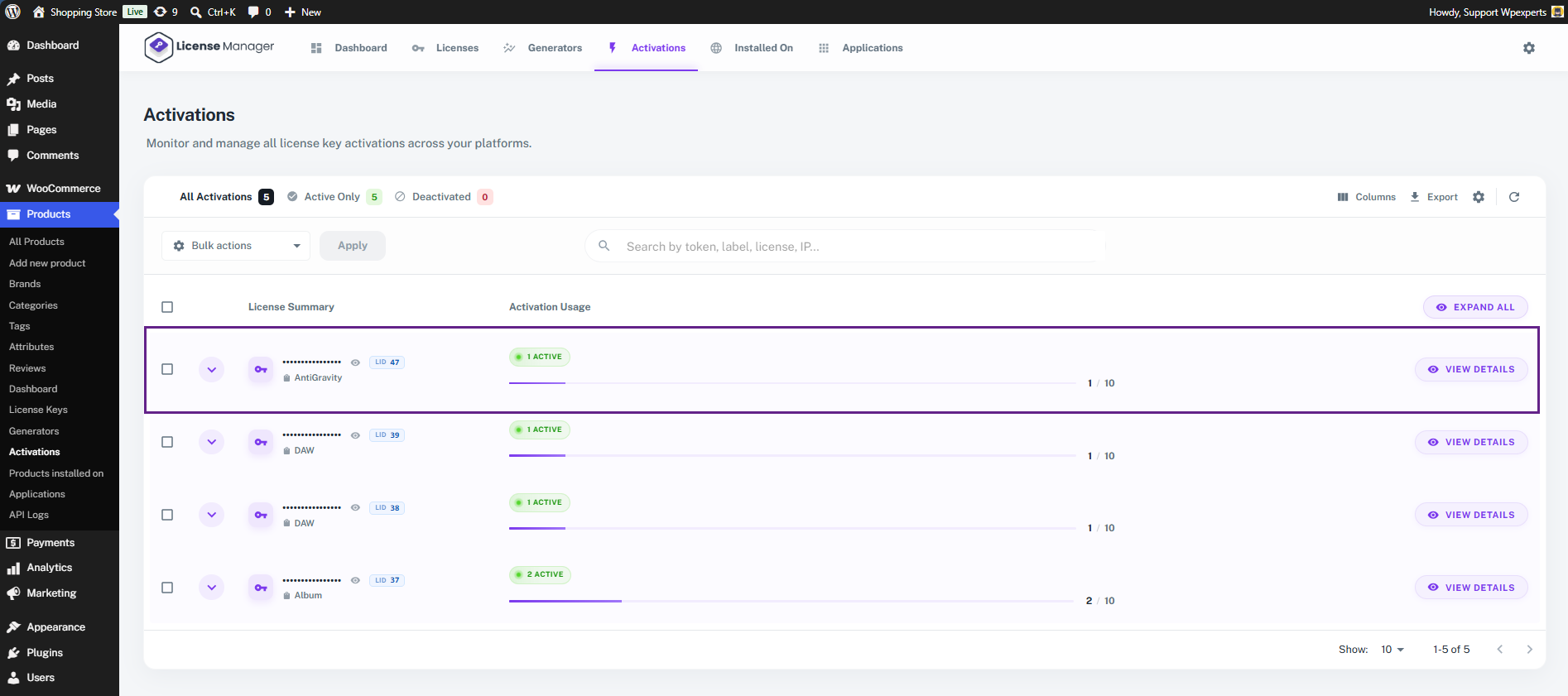
- All Activations (5): Displays the total number of license activation slots currently being utilized across all purchases.
- Active Only (5): Filters the list to show only the licenses that are currently live and valid.
- Deactivated (0): Filters the list to show historically deactivated licenses or inactive slots.
- Search Bar: Allows administrators to search for specific activations by token, label, license key, or Client IP address.
- Bulk Actions: Allows you to perform bulk activations, deactivations, and deletions across multiple selected license items simultaneously.
- Columns: Choose which columns to display or hide in your current view.
- Export: Download your license activation data as a CSV file for external reporting and analysis.
- Table Settings: Manage Columns and Display
- Refresh: Reload the license activation data table to fetch the latest real-time status updates.

License Summary & Usage Columns
Each row represents a parent license key and shows its overall resource consumption:
- License Summary: Displays the masked license key, its unique License ID (e.g., LID 47), and the specific product it is tied to (e.g., AntiGravity, DAW, Album).
- Activation Usage: Shows a visual progress bar and count of how many domains/devices have activated this key against the maximum allowed limits (e.g., 1 / 10 or 2 / 10).
Detailed Activation Dropdown (Expanded View)
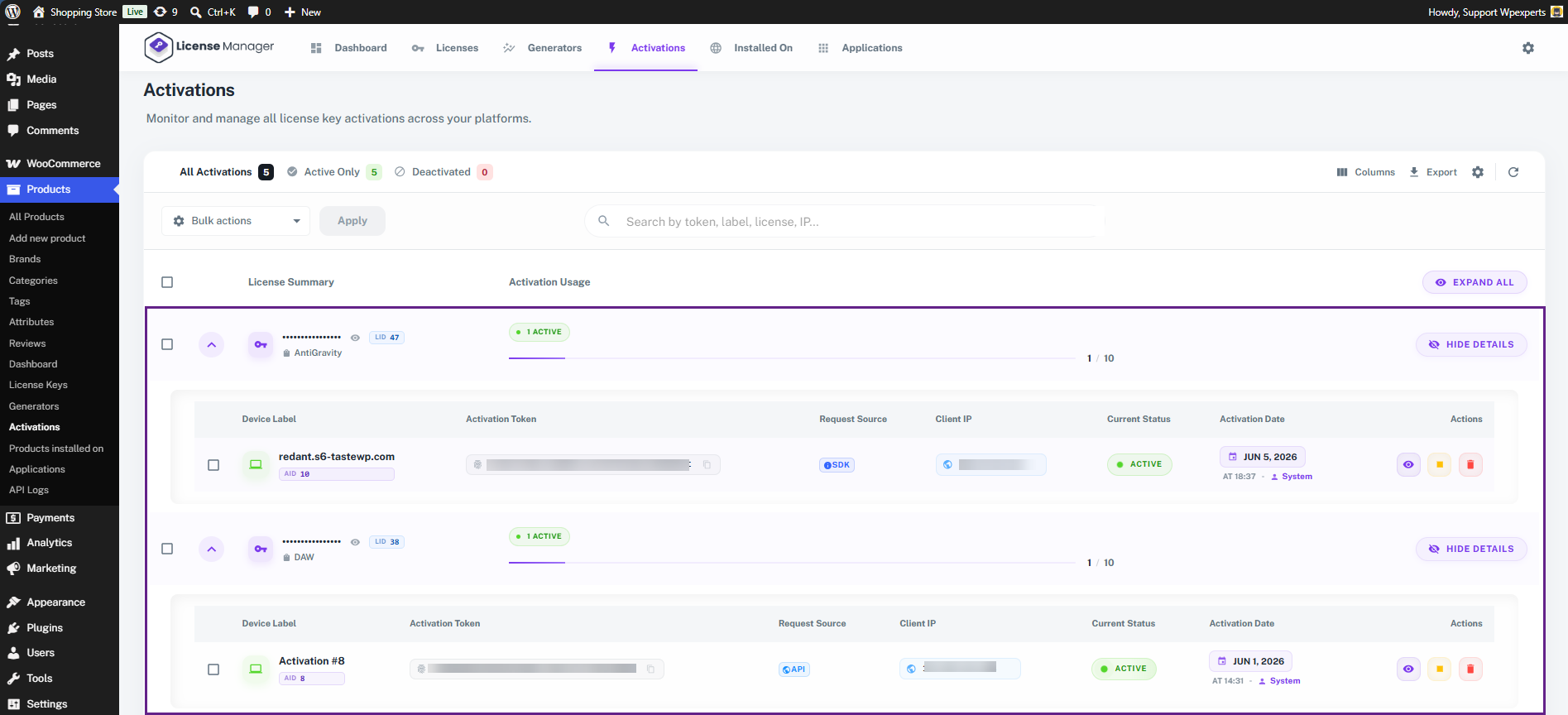
When an administrator clicks View Details, the row expands to show the precise technical metadata for every environment using that license:
- Device Label: The specific domain name or server path where the application is installed (e.g., redant.s6-tastewp.com) alongside its Application ID (AID 10).
- Activation Token: The unique, secure hash string generated upon activation to authenticate API requests between the client environment and your server.
- Request Source: Identifies how the license was validated. For instance, the SDK badge highlights that this activation was processed programmatically via your integration SDK.
- Client IP: Logs the specific server IP address making the validation requests, useful for security tracking and fraud prevention.
- Current Status: A clear visual indicator showing whether that specific device instance is currently Active or inactive.
- Activation Date: Logs the exact timestamp and system handler (e.g., JUN 5, 2026 AT 18:37 BY System) showing when the product instance went live.
- Actions: Quick-action buttons allowing the admin to view log entries, temporarily suspend, or completely delete/deactivate that specific device session.
- The admin can view the log entries in detail by clicking the View button.